
Expressvpn Glossary
Storage virtualization

What is storage virtualization?
Storage virtualization is a technology that combines multiple physical storage devices into a single virtual storage unit. Servers and applications can access it without needing to know the details of the underlying hardware.
The approach simplifies storage management and improves flexibility and scalability. It also helped enable many modern software-defined and cloud storage architectures.
How does storage virtualization work?
A virtualization layer sits between physical storage devices and the servers or applications that use them. It groups physical drives into a shared pool, hides the complexity of the underlying hardware, and directs input/output (I/O) requests to the appropriate physical resources.
This layer can present storage in different logical forms depending on the setup. In block-storage environments, hosts are typically given logical units, often identified by logical unit numbers (LUNs), which the operating system may treat like individual disks. In other setups, administrators may create logical volumes or virtual filesystems that can be resized and managed independently.
Virtualization software then uses metadata mapping tables to translate virtual addresses or logical resources to their physical locations for efficient data retrieval.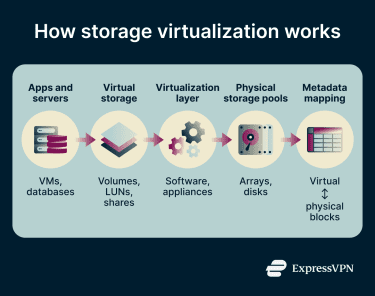
Types of storage virtualization
- Host-based: Software on the server pools and manages storage, presenting virtual drives to applications or virtual machines (VMs). The virtualization layer is implemented at the host level, regardless of the underlying physical storage device or array.
- Array-based: A primary storage array manages the pool, combining resources from internal or external arrays and presenting them to servers as logical storage, such as volumes or LUNs. Storage tiers such as solid-state drives (SSDs) and hard disk drives (HDDs) may be managed behind the scenes, while the physical location of data remains hidden from servers.
- Network-based: A network device, such as a switch or appliance, connects and pools all available storage, presenting them as a single virtual pool. Servers interact only with the virtual storage and have no visibility into the physical devices behind it.
Benefits of storage virtualization
- Lower costs: Instead of purchasing separate devices for each workload, organizations can pool existing hardware into a single shared resource. This can reduce hardware spending, improve storage utilization, and reduce stranded capacity.
- Less downtime: Virtualization can enable nondisruptive or low-disruption data migration between physical devices, allowing administrators to take a device offline for maintenance with minimal impact on running applications. Upgrades can often be completed faster and with less disruption.
- Scalability: Storage capacity can be expanded more flexibly as needs change. Organizations can provision storage more efficiently instead of overallocating capacity in advance.
- Simpler management: A single unified view replaces scattered, independently managed systems. Administrators can more easily add or remove storage, migrate data, and roll out changes across the storage pool.
- Fault tolerance: In some architectures, virtualization works with features such as redundancy, replication, clustering, and failover to improve availability when a drive or hardware component fails.
Where is it used?
Storage virtualization is used in enterprise IT operations, cloud environments, and other data-intensive workloads. Organizations use it to make better use of available storage capacity, simplify management, and improve flexibility.
It also plays an important role in edge computing, where IT systems operate outside traditional data centers. This includes locations like retail stores, manufacturing sites, branch offices, and industrial facilities. These environments typically have limited space, smaller IT footprints, and less on-site technical support. Storage virtualization can make it easier to manage storage across many locations without deploying fully independent storage systems at each one.
Challenges and risks of storage virtualization
- Performance bottlenecks: When multiple VMs or applications compete for the same physical resources, the system can slow down and disrupt operations.
- Data security and compliance risks: Environments spanning multiple locations or platforms can expand the attack surface and make it harder to maintain consistent security controls, visibility, and compliance with regulations such as the General Data Protection Regulation (GDPR) or the Health Insurance Portability and Accountability Act (HIPAA).
- Operational complexity: The added abstraction layer requires specialized skills and tools. Without them, IT teams face a higher risk of misconfigurations, management gaps, and service disruptions.
Further reading
- Virtual server vs. physical server: Key differences explained
- Desktop virtualization: The complete guide
- Security concerns in cloud computing and how to address them
- What is IaaS? Infrastructure-as-a-Service explained
- How to set up a virtual machine safely and avoid common mistakes