
Expressvpn Glossary
Storage capacity
What is storage capacity?
Storage capacity is the maximum amount of data a device, system, or service can hold. Data is stored as bits (binary units of either 0 or 1), and capacity is measured in bytes, commonly expressed in larger units such as kilobytes (KB), megabytes (MB), gigabytes (GB), terabytes (TB), petabytes (PB), and exabytes (EB). Some systems also use binary units such as kibibytes (KiB), mebibytes (MiB), and gibibytes (GiB).
Storage capacity applies to both local and networked environments, including internal solid-state drives (SSDs), hard drives, external drives, and cloud storage systems.
How does storage capacity work?
Several factors affect how much space is actually available for use:
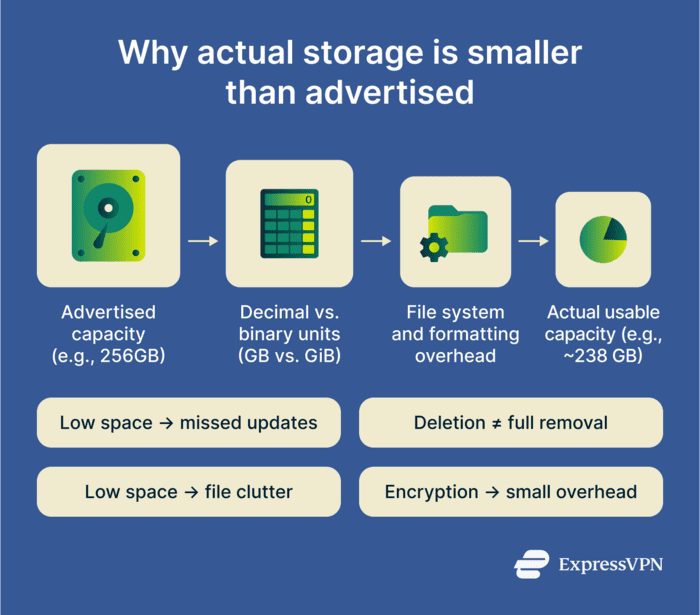
- File systems add overhead: Formatting a drive reserves some space for internal structures that track files and directories. This reduces the amount of space actually available for data storage.
- Advertised vs. displayed capacity: Even before file system overhead, the raw capacity figure can appear smaller than advertised on some systems. Manufacturers usually measure capacity in decimal units (where 1GB equals 1,000,000,000 bytes), while some operating systems and tools use binary units (where 1GiB equals 1,073,741,824 bytes). As a result, a 1TB drive may appear to be about 93GiB.
- Compression can increase effective space: Some systems compress data to reduce the physical space it occupies, allowing more data to fit within the same capacity.
- Deduplication: Some systems identify and remove duplicate copies of data, freeing up space without affecting the data itself.
- Encryption overhead: Depending on the file system or encryption method, encrypted storage may use a small amount of additional space for metadata or integrity information. In many cases, the impact on overall capacity is modest.
Why is storage capacity important?
Storage capacity matters because devices and systems need free space for everyday operation, not just for saving files. Operating systems use available storage for temporary files, background tasks, and software updates, so when a drive is nearly full, performance can suffer, and major updates may fail.
It also affects backups, logs, and auditing. Backup images, system logs, and audit records accumulate over time, and insufficient capacity can shorten retention periods or prevent complete backups. That can weaken recovery planning and, in some environments, make it harder to meet internal policy or regulatory retention requirements.
Storage capacity also shapes application and data growth. As software, media, and datasets increase in size, available storage affects how many applications and files can be installed, stored, and retained before expansion or cleanup becomes necessary.
Risks and privacy concerns
Limited or shared storage can create security gaps, such as:
- Deleted data may be recoverable: Deleting a file usually removes its reference rather than immediately erasing the underlying data. Depending on the storage system, later activity, and whether secure sanitization was performed, attackers with physical or remote access may still be able to recover it with forensic tools.
- Shared storage increases the risk of misconfiguration: In shared or outsourced environments, data protection depends on the correct configuration of permissions, access policies, and sharing settings. Mistakes in any of these can expose data to users or services that shouldn’t have access to it.
- Low capacity can drive unmanaged workarounds: When approved storage runs out, users may move data to personal accounts or portable drives to free up space. This bypasses security controls such as encryption, monitoring, and retention policies, leaving data outside the organization's oversight.
- Storage caps can weaken retention and backup practices: Cost controls and capacity limits can force shorter retention windows or result in incomplete backups, leaving gaps in audit trails and recovery options when they're needed most.
Further reading
- How to back up files and encrypt them
- Security concerns in cloud computing and how to address them
- What is network-attached storage (NAS)?
- Apple iCloud alternatives: How about external drives?
- End-to-end encryption: What it is and why it matters