
Expressvpn Glossary
Secure print
What is secure print?
Secure print (also called secure release printing) is a printing feature that queues a document rather than printing immediately and releases it only after the requesting user is authenticated at the printer.
It's primarily used to prevent sensitive documents from being left unattended in shared printer output trays and to ensure that printed documents are collected by the authorized user.
How does secure print work?
Secure print follows a controlled release process:
- A user sends a document to a secure print queue. The system stores the job until release, for example, on the printer device, a print server, or a print management service.
- The sender’s identity is verified using an approved authentication method, such as a PIN, QR code, badge, smart card, or directory-based sign-in.
- After successful authentication, the printer releases the job from the queue and prints the document.
- The system may log activity details such as the user, release time, and device used, depending on the print management platform and configuration.
- After printing, the job is typically deleted. If it's not released within a defined time window, many systems can automatically delete it.
In shared networks, secure print deployments often protect print data in transit, and some also encrypt held jobs at rest, depending on the product and configuration.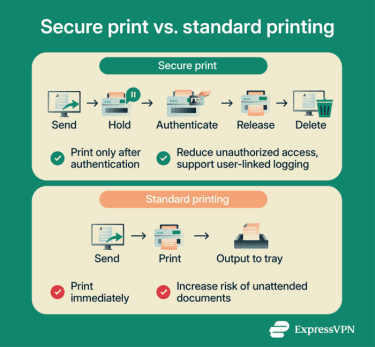
Types of secure print
- Held (device-bound) secure print: Stores the job for release on a specific printer and prints it only after the user authenticates at that device.
- Pull (follow-me) printing: Stores the job in a shared queue and allows release from any approved printer after authentication.
- Server-based secure print: Stores jobs on a centralized print server and uses that server to manage authentication, logging, and policy enforcement.
- Cloud-managed secure printing: Uses a cloud print management service to route or manage jobs and handle authentication and policy controls, often reducing or removing the need for a traditional on-premises print server, depending on the product architecture.
Where is secure print used?
Secure print is used in environments with shared printers where documents may contain sensitive, personal, or regulated information. Common settings include healthcare organizations handling patient records, offices that need controlled release to prevent unattended output, and regulated workplaces that require user-linked audit trails and access controls.
It's also used in distributed and hybrid workplaces to support secure release (including pull-print workflows) across multiple sites and approved devices.
Why is secure print important?
Secure print is important because it reduces the risk of confidential documents being viewed or collected by unauthorized people in shared print areas. Jobs are held until the requester authenticates at the device, which helps prevent unattended output and supports controlled access to printed information.
It can also create a user-linked record of printing activity (for example, who released a job, where, and when), which supports accountability and can help with audit requirements in regulated environments.
These controls are often used to support compliance and data-handling obligations under frameworks such as the General Data Protection Regulation (GDPR) and the Health Insurance Portability and Accountability Act (HIPAA), where limiting access to personal data and maintaining traceability are common expectations.
Because jobs are not produced until they are released, secure print can also reduce abandoned printouts and related paper and toner waste in shared environments.
Risks and privacy concerns
Secure print improves privacy at shared printers, but print jobs can still expose security and privacy. Jobs are commonly held in a queue on the printer, a print server, or in the cloud until the user releases them. If stored jobs are not properly protected and deleted or overwritten, retained job data can remain recoverable longer than intended.
Data in transit is another concern. Print jobs sent over unsecured networks can be intercepted, which is why encrypting print traffic is commonly recommended. Cloud-based printing can also increase exposure if access controls, authentication, or service configuration are mismanaged. Weak credentials can likewise undermine controlled release.
Finally, audit and print logs may include user identifiers and job metadata such as document names. If access to those logs is unrestricted, they can create additional privacy exposure.
Further reading
- How to find a printer's IP address
- How to set up a secure Wi-Fi guest network
- What is eavesdropping in cybersecurity, and how do you prevent it?
- What is two-factor authentication (2FA), and how to set it up securely
- Back to the office? 7 tips to protect your privacy at work