 Celebrate with up to 80% off
Virus signature explained: How it works and why it matters in cybersecurity



Virus signatures are a fundamental part of most antivirus software today. They’ve been around for several decades, defending against threats ranging from early worms to modern ransomware. But malware has evolved, and virus signatures alone are no longer sufficient to detect newer threats.
What is a virus signature?
A virus signature is a pattern used to identify known malware, often based on byte sequences, file hashes, or observed behavior (typically from stable parts of the code). Think of it as a fingerprint that tells antivirus software that a specific file or executable matches known malicious code.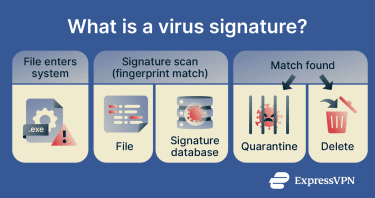
Many security protocols and products use signature databases to identify malware and quarantine or delete it before it can infect a system. The signatures in these databases can vary in length; some use longer sequences for precise identification, while others use shorter or partial patterns to detect modified versions of known malware, including polymorphic viruses.
Why virus signatures matter
Virus signatures remain a key part of many antivirus tools because they’re:
- Versatile: They can be used to detect entire families of viruses based on code similarities. In other words, they can be an effective method of detecting malicious software across multiple file types and infiltration methods.
- Easy to update: Security vendors can update signature databases quickly after identifying new malware. This allows tools using those updates to detect newly identified cybersecurity threats.
- Quick malware detection: Signature-based detection is typically fast. The software compares files or code patterns against a signature database, then quarantines or removes matched threats accordingly.
How virus signatures evolved
Virus signatures started as simple pattern-matching rules that looked for known sequences of code found in malware files. Early antivirus tools relied heavily on these static signatures, meaning they could only detect threats that had already been identified and catalogued.
As malware became more complex and frequently changed its code to avoid detection, signature-based methods evolved into more dynamic approaches. Modern systems now combine signatures with heuristic analysis, behavioral detection, and machine learning (ML) to identify threats based on suspicious activity patterns rather than fixed code alone.
How virus signatures are made
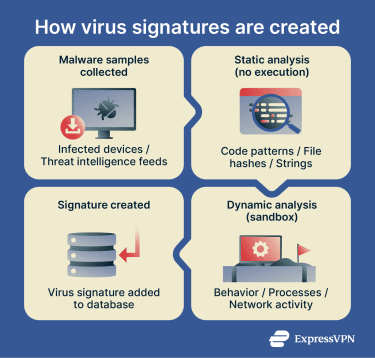
Virus signatures tell an antivirus solution what known malware looks like. Researchers create these signatures after analyzing known malware in a safe environment (like a virtual machine) and examining its structure and behavior.
In many cases, researchers analyze multiple samples of the same virus, which they either get “in the wild” (from infected devices) or from sources like threat intelligence feeds or underground forums. Then, they try to reverse-engineer the virus and find common characteristics like printable strings, file size, file hashes, or imported and exported functions.
How security teams analyze new malware
There are two main methods to analyze malware and create signatures:
- Static analysis: Examining a suspected virus (possibly a file or code) without executing or running it. This can identify unique characteristics or signatures that help detect similar threats on other systems.
- Dynamic analysis: Executing a malicious file or binary in a controlled environment to document its behavior. Compared to static analysis, which infers behavior, dynamic analysis can see what the virus actually does, which processes it interacts with or exploits, and how it behaves in a system. This can help confirm hypotheses formed during static analysis, leading to the creation of more complete virus signatures.
Manual vs. automated signature creation
Traditionally, researchers have used virus signature creation tools that provide cross-platform compatibility, memory scanning capabilities, and a rule-based understanding of how specific computer viruses work.
However, while manual methods can reliably document new malware, the increasing number of sophisticated viruses has made it harder to keep up with new threats. That’s where automated signature creation tools come into play. They’re able to assist with decompiling malware code, analyzing structural patterns in binaries (compiled program files), verifying hashes (checking unique file fingerprints), and attempting to reverse-engineer viruses automatically (or by automating a large part of the process).
How signature databases are updated
Once researchers have identified new virus characteristics, they can be shared within the security ecosystem, including with software vendors. The vendors then add the new signatures to their signature databases, and users receive these through software updates. New antivirus signatures may be added to databases daily and more frequently for critical threats, with some modern systems delivering updates in near real time.
How does signature-based detection work?
Signature-based virus detection works by matching specific identifiers against known malware in a database. This method can identify threats and trigger an alert when a match is found in the database.
How antivirus software matches known threats
Antivirus or anti-malware software looks for malicious patterns (like code, hashes, checksums, or behaviors) in files, applications, registry entries, or processes on a device. These patterns rely on the virus signatures in their database, which, as mentioned, receive updates regularly.
When initiating a scan, the software observes the files on a device and analyzes their characteristics. Then, it compares them to a database of known threats. If there’s a match, the user receives an alert prompting them to quarantine or eliminate the malicious file.
Most antivirus tools today offer more than just signature-based detection. Other techniques include:
- Heuristic detection: Instead of relying on exact matches, heuristics look for suspicious code characteristics or behavior patterns. This allows antivirus software to detect new or modified threats that signature-based detection might miss.
- Behavior-based detection: Monitors programs as they run and flags suspicious actions, such as encrypting large numbers of files or modifying system settings. This allows antivirus software to detect and stop unknown malware based on what it does, rather than how it looks.
- Cloud-based detection: Some antivirus tools send data to cloud servers for analysis, using reputation scores, prior observations, and ML to determine if a file is trusted or malicious. This allows for faster detection of new or rare threats, like zero-day and fileless malware, without relying solely on local signature databases.
Where signature-based detection works best
Signature-based detection works best against known malware that researchers have previously identified and documented. Many attacks reuse known malware families or previously identified variants, which signature-based detection can reliably identify.
Signature-based detection is based on exact pattern matching and, depending on the type of signature, may detect some polymorphic or metamorphic malware if invariant patterns exist.
Why new threats can bypass signatures
Newer threats can bypass signature detection for several reasons:
- No existing signature: Zero-day malware has no signature in an antivirus database. Since signature-based detection is generally reactive, it requires a known pattern or code similarity to work with. If the threat is completely novel, it won’t be able to detect it.
- Obfuscation techniques: Some emerging malware uses evasive techniques to make its code unreadable to signature detection tools, including encryption, code packing, polymorphism, and signature manipulation. This can involve changing variable names, adding junk instructions, or reordering payloads to prevent static analysis. In many cases, the actual payload is only visible at runtime, preventing signature engines from analyzing it beforehand. Advanced evasion techniques (AET) can combine multiple obfuscation methods to hide the payload.
- Memory-only malware: These are fileless threats that can run only in memory or hijack legitimate system tools like PowerShell on Windows to infect a device and exfiltrate data. Signature-based tools may find it more difficult to detect and remove this kind of malware.
The emergence of AI-assisted malware has made it increasingly difficult for signature detection to keep up. AI threats can dynamically generate new malicious code, obfuscate it, and run in memory to reduce traces on disk. They can also convincingly mimic legitimate application behavior, which makes detection more difficult.
What types of virus signatures are used?
There are four common categories of virus signatures.
Static signatures
Static signatures are fixed patterns identified in the binary content of a file that researchers can observe without running the virus in a safe environment. These patterns can include byte sequences, strings, and file hashes that are present in the virus’s contents and that are assumed to remain consistent across multiple virus samples.
However, static signatures are much less effective against modified variations or new strains of a virus. While partial signatures may be more accurate, they frequently prove unable to reliably identify polymorphic viruses.
Dynamic signatures
Dynamic signatures describe the patterns in virus behavior when they run on a device. Instead of exact code matches, these signatures contain patterns in behavior commonly associated with malware and track similar activities. These include launching processes, making network connections, creating files, or deleting registries.
Antivirus solutions often use heuristic threat analysis to identify suspicious behavior patterns and generate or refine dynamic signatures. They can observe and record suspicious actions performed by viruses and compare them to the behaviors of known threats. Even if the observed virus is unknown (it has no exact static signature in databases), heuristic analysis is generally able to create a dynamic signature to help identify it.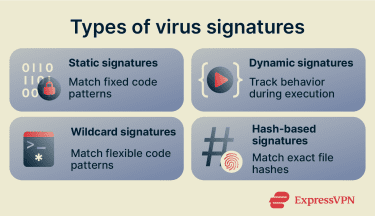
Wildcard signatures
Wildcard signatures are static signature techniques that use flexible code structures (like the “?” character) to detect shared characteristics across a malware family or account for variations in the code structure. Polymorphic viruses are known to change parts of their code, while metamorphic viruses can change their entire code with every iteration to escape detection while retaining functionality.
By not requiring 1:1 code matches, wildcard signatures can help reduce false negatives. They’re also able to detect modified versions of viruses that pure static signatures may miss, as well as common techniques used by polymorphic and metamorphic viruses, such as register swapping. However, wildcards become less effective against more advanced metamorphic techniques.
Hash-based signatures
Hash-based signatures contain unique values (like checksums or cryptographic hashes) created by scanning a file’s contents to identify a virus. Antivirus solutions can use these hash signatures to detect other files that contain matching hashes of a known virus.
These signatures are reliable for identifying known threats but tend to become ineffective at detecting virus variations. This is because these signatures are static and use exact-match detection. Virus variations produce different hashes that don’t match the hash signature in the database.
What are the benefits and limitations of virus signatures?
Here are the advantages and disadvantages of virus signatures and signature-based detection:
Pros of signature-based scanning
- Fast and efficient: Uses lightweight pattern matching to check files and usually has a low impact on system performance.
- Fewer false positives: Specific pattern matching can make detections more precise and clear matches are easier to verify and audit.
- Easy to deploy and maintain: Usually requires minimal user intervention; signature updates are handled automatically.
- Effective against known malware: Works well for known, well-documented threats.
- Mature and reliable: A long-established detection method.
Cons of signature-based scanning
- Limited against new or modified malware: Struggles with threats that do not match existing signatures.
- Dependent on signature quality: Accuracy depends on the quality and number of malware samples used to create signatures.
- Requires fast updates: New signatures need to be created and distributed quickly.
- Can be evaded: Attackers may use techniques like file padding or file pumping to change malware size and avoid certain signature constraints. Malware can also be packed, encrypted, or hidden to make patterns harder to detect.
- Hard to maintain at scale: New malware variants can appear faster than signatures can be written and growing signature databases can increase storage needs and update times.
- Depends on visible patterns: Works best when malware patterns are accessible and easy to inspect; less effective when malware behavior or code is obscured.
Why modern cybersecurity goes beyond signatures
Virus detection has evolved from simple pattern matching to incorporating more advanced techniques, including behavioral analysis. As internet usage expanded, the volume of new malware increased rapidly, and attackers began developing more sophisticated threats. This meant it was no longer enough to rely on manually identifying malware and updating signature databases.
Tools like endpoint protection platforms (EPPs) and endpoint detection and response (EDR) solutions introduced additional detection methods. These approaches use heuristic and behavioral analysis to focus on how files behave instead of just their code. The idea was to associate their behavior with potentially malicious activities (like file encryption).
Recently, AI has helped antivirus software take another leap forward in virus detection. ML algorithms can now support:
- More accurate predictive threat detection: AI can help reduce false positives and improve the detection of unusual behavior associated with malicious activities. This helps detect threats like zero-day attacks, which exploit previously unknown vulnerabilities.
- Better adaptability to emerging threats: ML allows antivirus solutions to analyze large datasets to refine detection over time. This can help identify patterns indicating new threats.
- Automatic threat response: AI-assisted solutions can identify threats, isolate endpoints (like devices), block malicious processes and activities, and, in some cases, begin remediation steps.
Next-generation antivirus (NGAV) solutions combine ML, heuristics-based behavioral detection, and exploit mitigation to protect against known and unknown threats. This reduces reliance on frequent signature updates but doesn’t eliminate the need for them, because signatures remain the fastest and most reliable way to identify known malware with high accuracy and low false positives.
How can you improve protection beyond virus signatures?
Signature-based detection works best as part of a broader security approach. Here’s what that means.
Use multi-layered antivirus protection
Some modern threats can bypass signature-based detection. It helps if your security software includes real-time behavior-based monitoring, heuristic analysis, and AI-driven detection. These layers can help detect threats that don’t match known patterns.
While most modern antivirus tools already combine these advanced analysis features, not all solutions offer the same level of protection. Ideally, the software should be able to identify zero-day and fileless threats and adapt to new attack patterns over time. It may also monitor memory and system activity, which helps detect these emerging threats.
A layered security model is generally more effective overall than relying on a single method.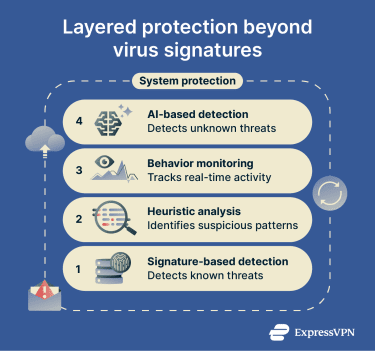
Follow everyday malware prevention best practices
In addition to using modern and reliable antivirus software, you can improve personal protection against viruses and other malware by following some simple cybersecurity best practices:
- Keep systems and apps updated: Installing the latest security updates for your operating system (OS) and apps helps protect you against newly exploited vulnerabilities.
- Avoid running untrusted files: Don’t open or execute files unless you’re confident they’re safe. Even legitimate-looking downloads can be malicious.
- Be wary of suspicious email attachments: Don’t open attachments or click links from unknown or unexpected senders, as many attacks start with phishing emails.
- Use a standard (non-admin) account for daily use: Running your OS without admin rights (like using a standard account on Windows) limits what malware can install or modify on your system if you’re infected.
- Use only trusted software sources: Download apps only from official websites or verified stores to reduce the risk of bundled or disguised malware.
- Back up data: Backing up your important data to an external drive or to the cloud can limit the impact of a successful malware attack (especially ransomware).
FAQ
How quickly can antivirus vendors create a new virus signature?
Can a virus change its signature to avoid detection?
Do all antivirus tools use the same virus signatures?
What is the difference between a virus signature and a hash?
Can signature-based detection stop zero-day threats?
Why do antivirus tools need frequent signature updates?