Malware vs. virus: Key differences explained


When a device slows down, crashes, or starts showing suspicious pop-ups, most people assume it’s a virus. The term “virus” (often used as shorthand for malware) appears frequently in search bars, support tickets, and conversations, even though many modern infections don’t behave like classic computer viruses at all.
This article explains how malware and viruses relate and differ. It also explains how malicious software operates today, the forms it commonly takes, and what these differences mean for prevention and removal.
What is malware?
Malware is an umbrella term for malicious software or firmware. Once active, it can compromise the core security principles known as the CIA triad: confidentiality (by stealing data), integrity (by altering files), and availability (by disrupting access to systems).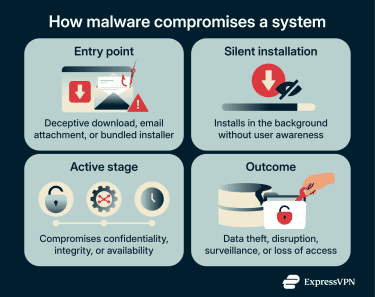
Malware often gets into a system without the user’s knowledge. Some types rely on deception to trick users into installing them, while others spread automatically without user interaction.
Common types of malware
Different malware types target systems in different ways, from locking files to silently collecting data. Here are the common types of malware and their goals:
- Ransomware: Encrypts files or locks entire systems to prevent access. Attackers demand payment (ransom) to restore access. Many variants also steal data and threaten to publish it if victims refuse to pay.
- Trojans: Disguise themselves as legitimate or useful software to trick users into installation. Once active, they can steal data, perform unauthorized actions, or provide attackers with remote access to the system.
- Spyware: Monitors activity and collects information without the user’s knowledge. It commonly targets sensitive data such as login credentials, personal messages, or financial information.
- Worms: Spread automatically across systems or networks without relying on a host program or user interaction. Their self-contained design allows them to replicate and propagate rapidly once they enter a network.
- Adware: Displays unwanted advertisements during normal device use. Some ads redirect browsers to unsafe websites or install additional programs, increasing exposure to other security risks.
- Keyloggers: Record keystrokes as users type. This allows attackers to capture passwords, authentication data, and other confidential information directly from user input.
- Rootkits: Conceal themselves and other malicious programs while maintaining deep system access. Their primary purpose is to help attackers maintain long-term, undetected control by making detection and removal difficult.
What is a virus?
Viruses are a subset of malware. What distinguishes them from other types, such as worms and trojans, is their reliance on host programs and their ability to self-replicate.
A virus works by inserting its code into other programs or, in some cases, into boot code or documents that support active content. There, it remains inactive until the infected host is run (or the system boots). The virus then activates and can spread by infecting additional programs or files on the system. It can also reach other computers when infected files are shared, for example, via removable media, file sharing, or email attachments.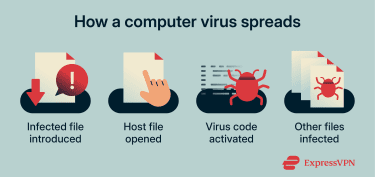
Types of viruses
Viruses are often categorized by what they infect and what triggers execution:
- File-infecting viruses: Attach to programs that get run. Infection can spread when infected programs are executed and then copied or shared.
- Boot-sector viruses: Infect the boot code and can run during the boot process, historically spreading via infected removable media.
- Macro (document) viruses: Hide in files such as Word documents, spreadsheets, or templates and activate via macros or active content.
- Script-based malware: May appear as script files (for example, JavaScript or VBScript) and run when opened or permitted, often delivered via downloads or email, but isn’t always classified strictly as a “virus” in every taxonomy.
Viruses are also sometimes described by their behavior or techniques, for example, polymorphic (changes code to evade detection), resident (stays in memory), or multipartite (infects more than one area).
What’s the difference between malware and a virus?
Malware is an umbrella term for many types of malicious software. A virus is one specific type within that category.
| Malware | Virus | |
| Scope | Broad category covering many types of malicious software/firmware | A specific type of malware |
| How they spread | Uses many methods, including phishing, malicious downloads, and exploitation | Typically spreads through user actions like running a program or booting a system |
| Host dependency | Some types don’t require a host program or user action | Relies on a host program or file to activate |
| Activation trigger | May execute automatically or after specific conditions are met | Activates only when the infected host is executed |
| Replication | May or may not replicate, depending on the type | Self-replicates by attaching to other files or programs |
Beyond these core distinctions, there are other differences between a virus and malware:
- Signature detection: Some classic file-infecting viruses can be detected via file changes and known signatures, but modern malware (and some viruses) often uses packing, encryption, or polymorphic techniques that reduce the reliability of static signatures.
- Command and control (C2): Many modern malware families maintain C2 to receive instructions, update payloads, or exfiltrate data, while many classic viruses spread without ongoing remote control.
- Privilege behavior: Viruses usually run with the same privileges as the host file they infect. Many malware families attempt privilege escalation when higher access is needed for persistence, credential theft, or disabling defenses.
- Payload structure: Traditional computer viruses were typically designed to contain all their code in a single file. Many malware campaigns use staged delivery (a small initial component that downloads additional parts), which can complicate early detection.
- Visibility trade-offs: Because viruses modify files to spread, they leave detectable evidence behind. Malware that minimizes on-disk changes or abuses legitimate tools can be harder to spot quickly, which may contribute to longer undetected activity.
- Defensive implications: Some viruses may be spotted through file scanning and signature matching. However, effective detection often also relies on behavioral signals and (where available) memory and network telemetry. Treating all malware as viruses can lead to security gaps.
How to protect your devices against malware and viruses
Device protection is most effective when you combine multiple layers of defense. For example, a browser extension might block phishing pages, but it may not stop malware delivered through a malicious attachment or a Trojan disguised as legitimate software.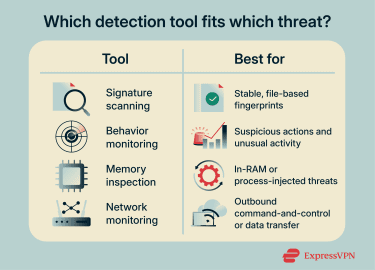
Security software and antivirus tools
Antivirus and security tools are a core layer of defense, designed to monitor for major types of malware and help prevent or contain malware incidents.
Good tools can scan downloads and quarantine known threats. Behavioral monitoring is especially important because many attacks no longer rely on self-replicating viruses and may initially blend in with normal activity (including Trojans, ransomware, and some “fileless” techniques).
To benefit from antivirus protection, you should enable real-time protection and run full scans regularly. It’s also worth enabling detection for potentially unwanted programs (PUPs), such as bundled toolbars, shady installers, and adware, which can degrade performance or increase exposure to additional risks.
If your security suite offers ransomware protection, such as controlled folder access (CFA), it can help protect important folders by blocking unauthorized or suspicious apps from modifying files.
Safe browsing and email practices
Many infections start with a normal-looking download, a convincing phishing page, or a fake update prompt.
A useful rule of thumb is to treat any download from unverified third-party sources as suspicious. If a site insists on installing a browser extension or running an installer just to view content, that’s a red flag.
Email is a common delivery path for malware because deception tactics are highly effective. Malicious messages often impersonate legitimate companies and create a sense of urgency to prompt rushed clicks on links or attachments. Sender details can also be spoofed, so it's helpful to inspect the full address and be cautious about unexpected ZIP files and attachments.
When an email threatens account suspension or demands urgent action, it’s best to access the service directly (via a known URL or the official app) to verify the notification before clicking the link.
Software updates
Software updates patch known security vulnerabilities that attackers can exploit. If a device runs outdated OS or browser versions, simply visiting a malicious page might be enough to compromise it.
Prioritize updates for your operating system, web browsers, and apps that handle untrusted files, such as PDFs, archives, and media. Enabling automatic updates ensures you don’t forget them. It’s also a good idea to uninstall apps you no longer use, because software that stops receiving updates becomes a permanent vulnerability.
Here are real-world cases that show how delayed updates led to large-scale compromises:
- WannaCry (May 2017): Exploited a Windows Server Message Block (SMB) flaw that Microsoft addressed in March 2017 with the MS17-010 security update. Organizations that delayed updates were hit hard, including the U.K. National Health Service (NHS), where systems were disrupted and services were impacted. The malware could spread automatically across networks once it found vulnerable machines. Microsoft later issued emergency patches even for some unsupported Windows versions after the outbreak.
- NotPetya (June 2017): Often described as a follow-up wave that again exploited SMB weaknesses on unpatched Windows networks (addressed in Microsoft’s earlier MS17-010 update). It also incorporated EternalBlue as one of several lateral-movement techniques. It spread quickly after initial compromise, contributing to major outages and rebuild efforts at firms including Maersk, Merck, and FedEx’s TNT Express. Disguised as ransomware, it was designed to be destructive and frequently left data unrecoverable.
- Equifax (July 2017): The breach occurred because a known Apache Struts vulnerability (CVE-2017-5638) went unpatched for months. Attackers used it to access systems holding highly sensitive personal data. As a result, information belonging to roughly 147 million people, including Social Security numbers, was exposed. Apache resolved the underlying issue in updated Struts releases (fixed in Struts 2.3.32 and 2.5.10.1), and Equifax said it patched the affected web application after identifying Struts as the initial attack vector.
- Log4Shell (December 2021): Targeted a flaw in the widely used Log4j logging library. Apache addressed it by releasing Log4j 2.15.0, which disabled the vulnerable behavior by default (with further releases issued after the initial fix proved incomplete in some non-default configurations). Attackers continued exploiting unpatched systems months after fixes were available, often targeting organizations that didn’t know which systems contained the vulnerable component.
Backup strategies
While backups don’t stop malware, they can change the outcome of an attack, especially ransomware. If ransomware encrypts your files or malware destabilizes your system, a known-good backup can support recovery and reduce downtime. That’s why backups are part of security, not just storage management.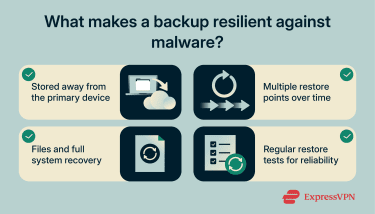
A strong backup plan follows the 3-2-1 rule: three copies of important data, on two different types of storage, with at least one copy kept offsite. The last point matters because ransomware can encrypt any drives connected to the infected system (including connected drives and reachable network shares). A smart backup strategy follows these rules:
- Versioned backups: Keep multiple restore points from different dates. Some attacks can corrupt or alter data before detection, so older versions can provide cleaner recovery points.
- Offline backups: Ransomware can encrypt storage that's accessible during an infection. Backups stored on unplugged external drives or other disconnected storage are harder for malware to reach.
- Offsite backups: Keeping at least one backup outside your primary location protects against device theft, hardware failure, and site-wide incidents, and can help if local backups are affected.
- System images for full recovery: File backups protect data, but system images can speed recovery after severe infections. In some cases, rebuilding from a clean image is more reliable than attempting in-place cleanup.
- Restore testing: A backup that can’t be restored isn't useful. Periodically testing restores confirms data integrity, access permissions, and recovery time. This avoids discovering failures only after an incident, when recovery time matters most.
FAQ: Common questions about malware vs. viruses
Is a Trojan a virus or malware?
A Trojan is a type of malware, not a virus. It appears to perform a legitimate function while hiding a malicious function. Unlike viruses, Trojans don’t self-replicate or spread by infecting other files, though they may be bundled with legitimate-looking software or delivered as standalone executables.
Does an antivirus remove malware?
Yes, a good antivirus can detect and remove many types of malware using signature databases and behavior techniques. Antivirus software is designed to monitor for major types of malware and help prevent or contain malware incidents.
If the malware is caught early, removal is often simpler. However, threats such as rootkits and boot-level malware, especially those with admin access, are harder to detect and remove because they’re designed to hide their presence or interfere with normal system operation. In these cases, cleanup may require scanning from a trusted environment (for example, an offline scan) or restoring from known-good media.
How does ransomware compare to viruses?
Ransomware blocks access to systems or files, often through encryption, to pressure victims into paying a ransom. Viruses focus on infecting other programs or files to replicate, hiding until the infected host is activated. Their goals and mechanisms differ even though both are forms of malware.
What are the signs of malware infections?
Since malware comes in different types, the signs of an infection can vary. Sudden slowdowns, frequent crashes, unusually high CPU or memory usage, or overheating may indicate malicious activity running in the background (though these symptoms can also have non-malicious causes). Files may go missing, become corrupted, or turn unreadable, and persistent pop-ups, fake security alerts, or unexpected changes to browser or system settings can also signal an infection.
How can I protect my computer from malware?
Protecting a computer from malware typically involves using reputable security software and keeping your OS and apps up to date. Being cautious with unexpected links, pop-ups, and untrusted downloads can further reduce exposure to common infection paths.
Take the first step to protect yourself online. Try ExpressVPN risk-free.
Get ExpressVPN